
The V-MAT
Parent Guide
Everything you need to enroll, sign in and help your child learn with Mr. Saji Raghav and Vimo — step by step, with pictures of every screen.

Welcome to the family
Thank you for choosing V-MAT
V-MAT helps children aged 5 to 16 become fast, confident and accurate with numbers. Your child learns from short lessons with Mr. Saji Raghav and our friendly guide Vimo, practices with math games and worksheets, and you can see the progress every week.
10–15 minutes a day
Little and often works best — a short lesson or game most days.
Practice in writing
Printed worksheets make the new skill stay for life.
See the progress
Your family page shows every lesson, streak and V-GEM.
What is inside V-MAT
🎬 Lessons
Short video-style lessons. Mr. Saji Raghav teaches, Vimo makes mistakes, and your child puts them right.
🎮 Math games
Every game is built on the lesson — each move needs a correct answer.
📄 Worksheets
Printable pages with your child's name on them, which earn V-GEMS.
💎 V-GEMS
Rewards for real practice — never bought, never for clicking.
🧠 Daily 5-minute check
Remember · Revise · Speed — and a speed score every day.
🎥 Live classes
Small live classes with a V-MAT teacher (on the Live plan).
Contents
Part 1
Enroll in a few minutes
You can enroll directly on our website, on a laptop or a phone. You do not need an account first — it is created for you while you enroll.
- Open our website — vmat.uk in the UK, vmat.in in India, v-mat.us in the USA and Canada. Prices are shown in your own money (, ₹ or US$).
- Choose a program. On the home page or the Programs page, press Enroll now on the course that suits your child's age. Not sure? Press Course details first to see every lesson, or book a free trial.
- Several courses or children? Press 🧺 Add to basket on each course. A small basket button follows you on every page — press it when you are ready.
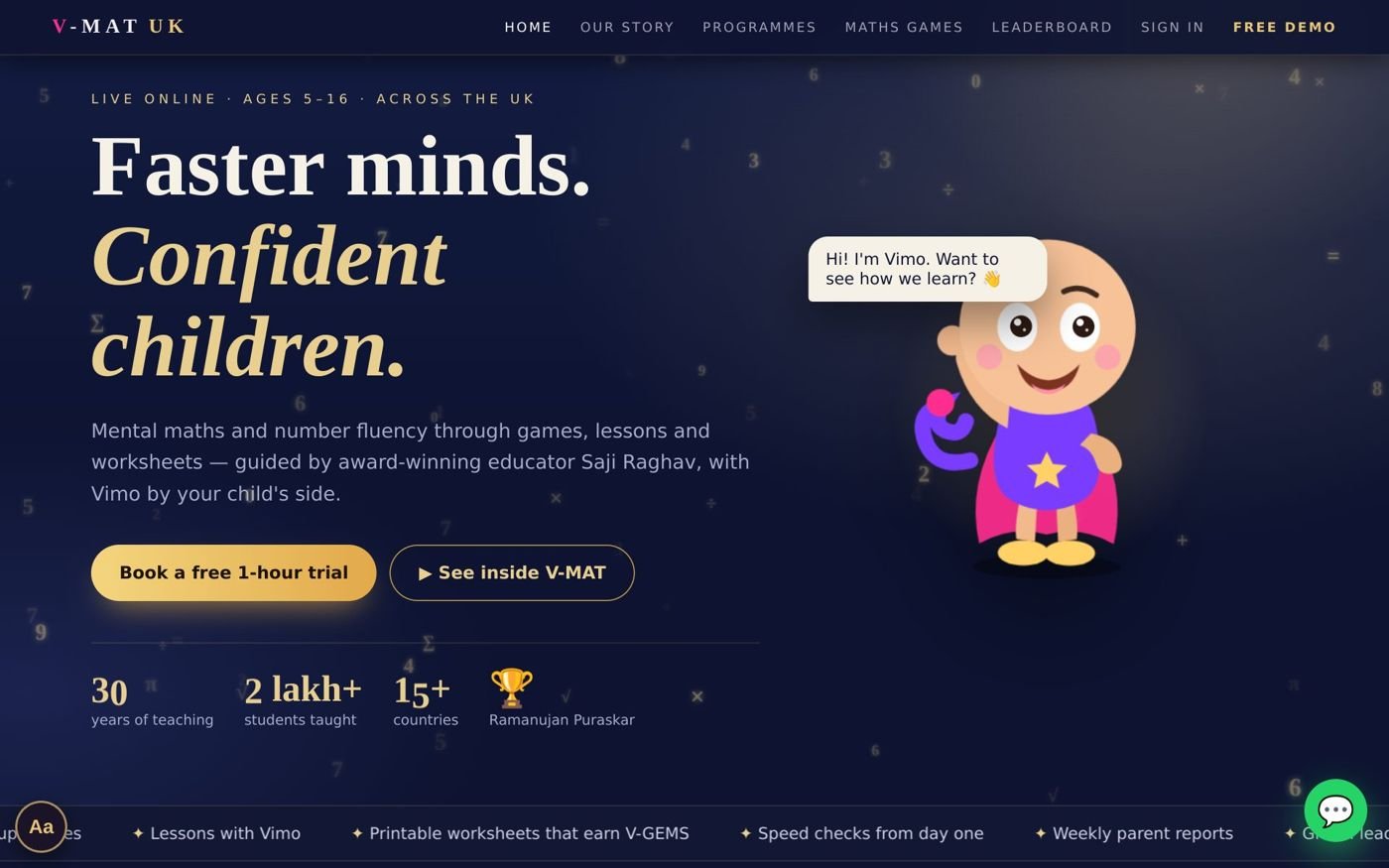
The home page — every program has an Enroll now button.
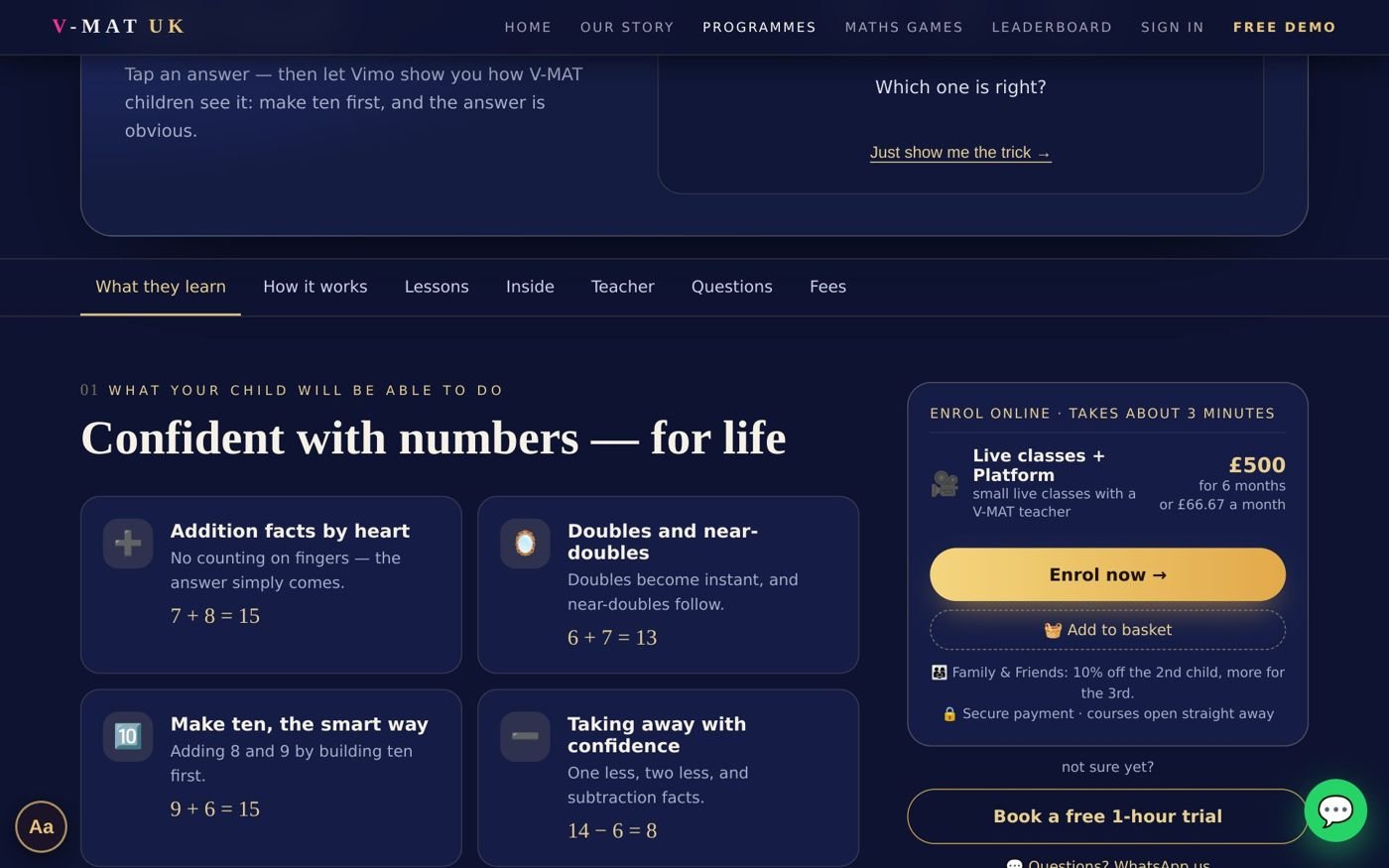
Each course page shows the prices and an Enroll now box.
Part 2
Plans, prices and discounts
For every course in your basket you choose a plan and how to pay. The total on the right updates as you choose.
| Plan | What your child gets |
|---|---|
| 💻 Self-study Platform only | All lessons, games and worksheets, at any time. Starts instantly. |
| 🎥 Live + Platform | Everything in Self-study plus small live classes with a V-MAT teacher. We message you on WhatsApp within one working day with the class times. |
| How to pay | How it works |
|---|---|
| Full course 6 months / full level | Pay once. Every module opens at once and stays open for the whole period. |
| 1 month monthly plan | Pay only the monthly amount. Module 1 opens now, and each new month opens the next module (see page 6). |
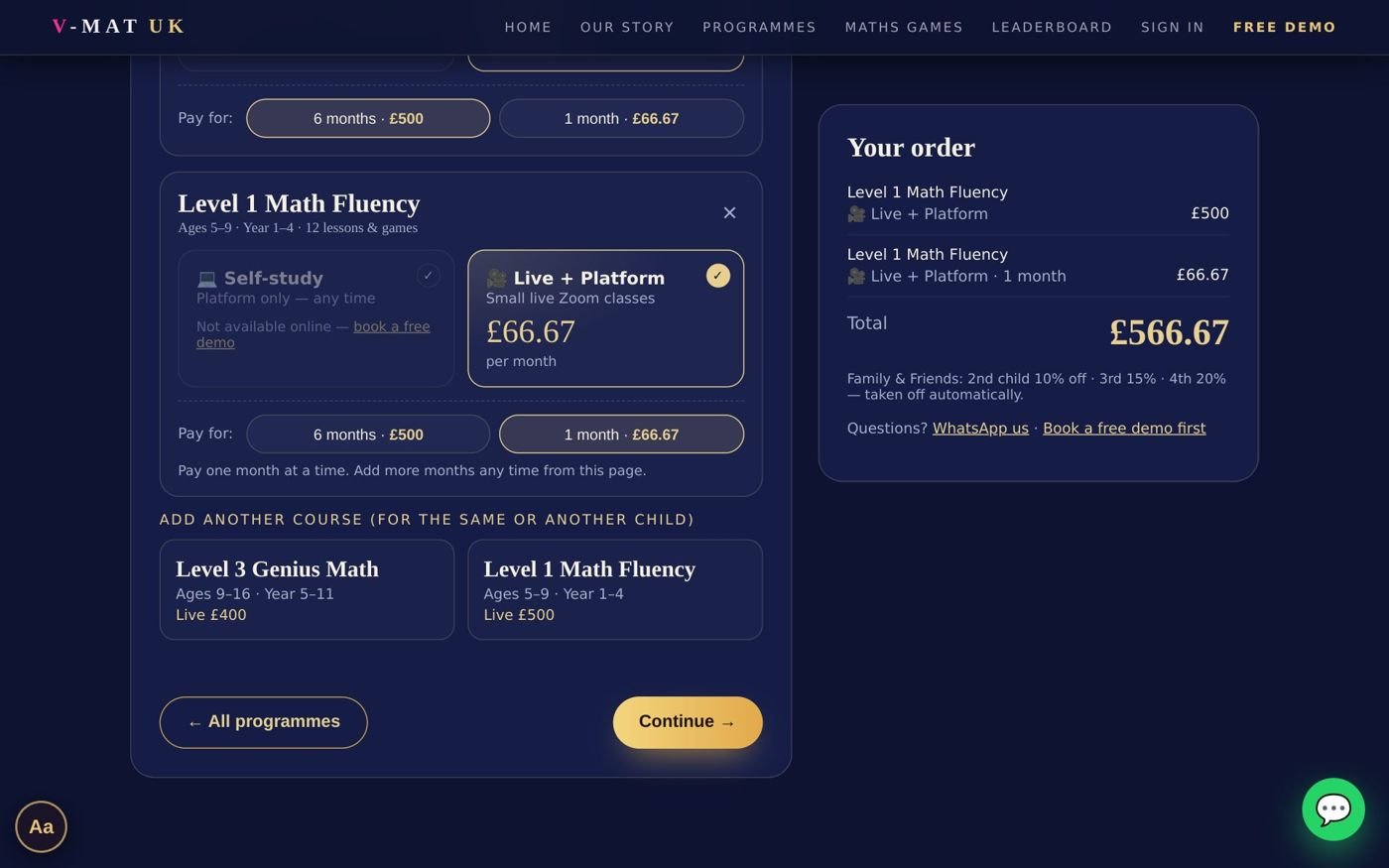
Step 1 of the checkout — choose the plan and “Pay for: 6 months or 1 month” for each course.
👨👩👧 Family & Friends discount
Taken off automatically for every extra child in your family:
- 2nd child — 10% off
- 3rd child — 15% off
- 4th child and more — 20% off
Your family details
- Your details — your name, mobile / WhatsApp number, e-mail and a password you choose. Tick the box to confirm you are the parent or guardian. Already with us? Press Sign in instead — your children are already there.
- Your children — the first name and age of each child. Press + Add another child for brothers and sisters, then choose who each course is for. Children never need their own e-mail.
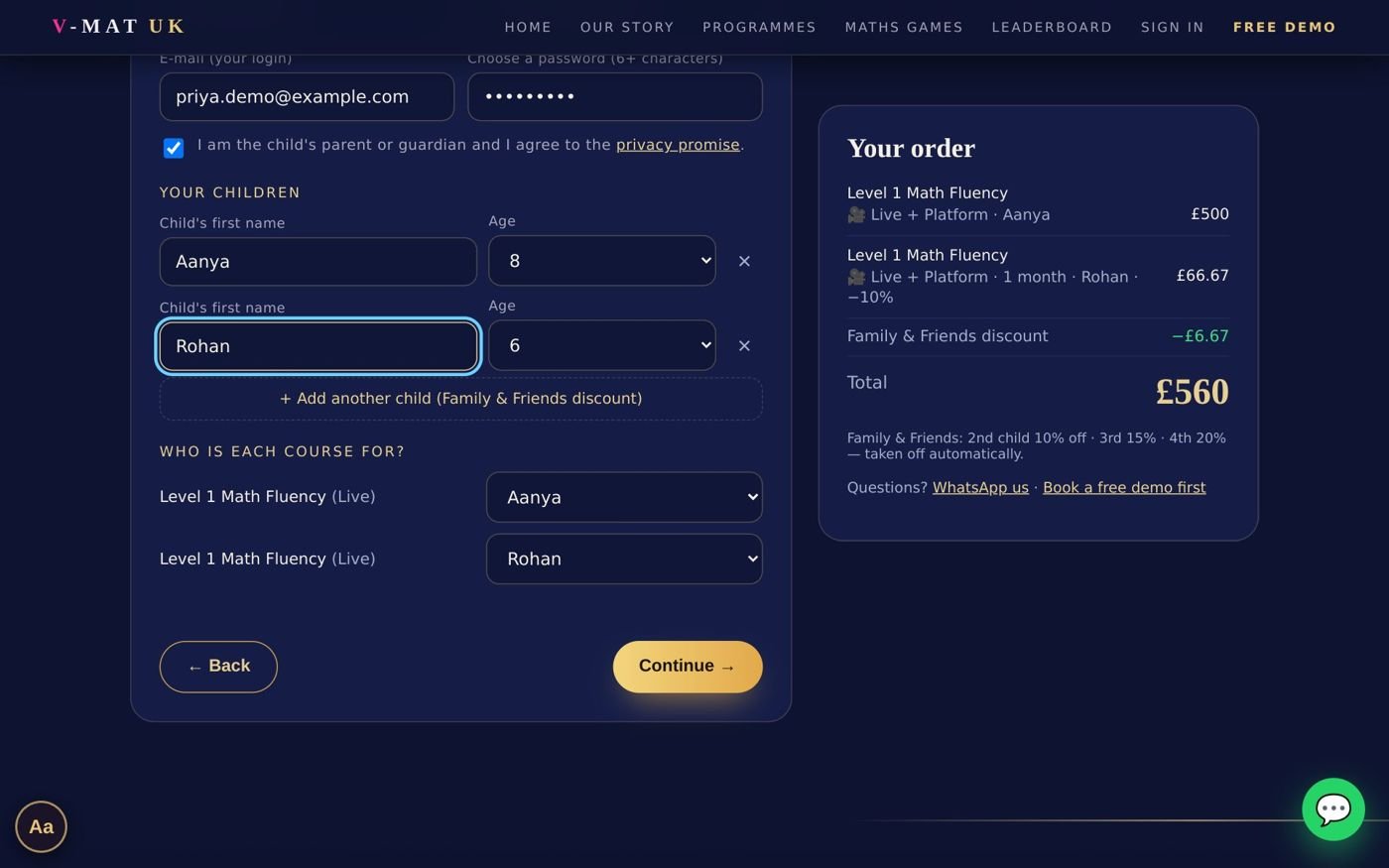
Step 2 — one parent account for the whole family. The Family & Friends discount appears on the right.
Pay securely
- Tick “I agree to the Terms and the Refund policy” and press Pay securely. The secure Razorpay window opens — pay by card, UPI, net banking or wallet (the options depend on your country).
- The moment the payment is done, the golden door opens and Vimo welcomes your child. The courses are unlocked straight away, and your receipt arrives by e-mail.
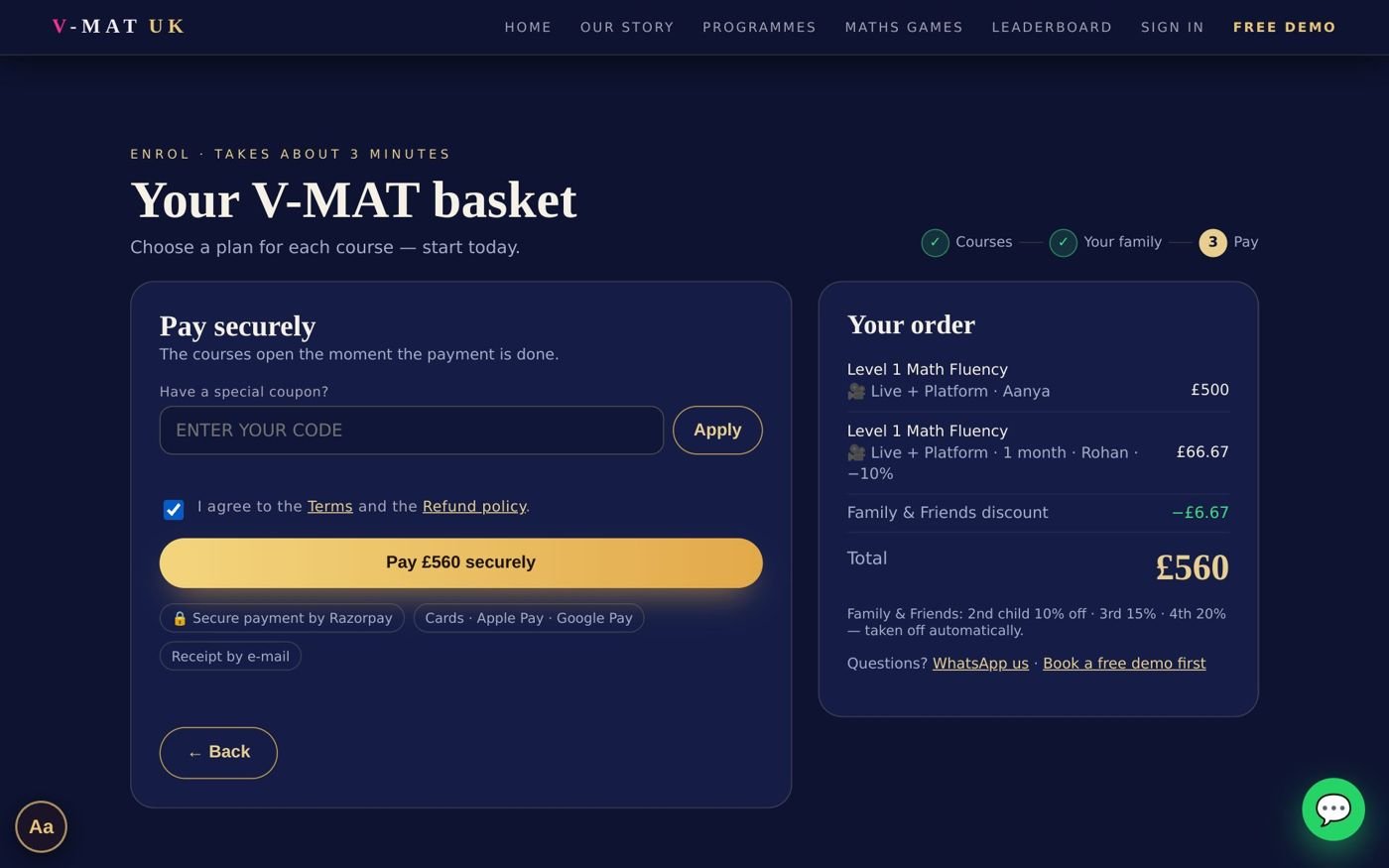
Step 3 — coupon box, agreement and secure payment.
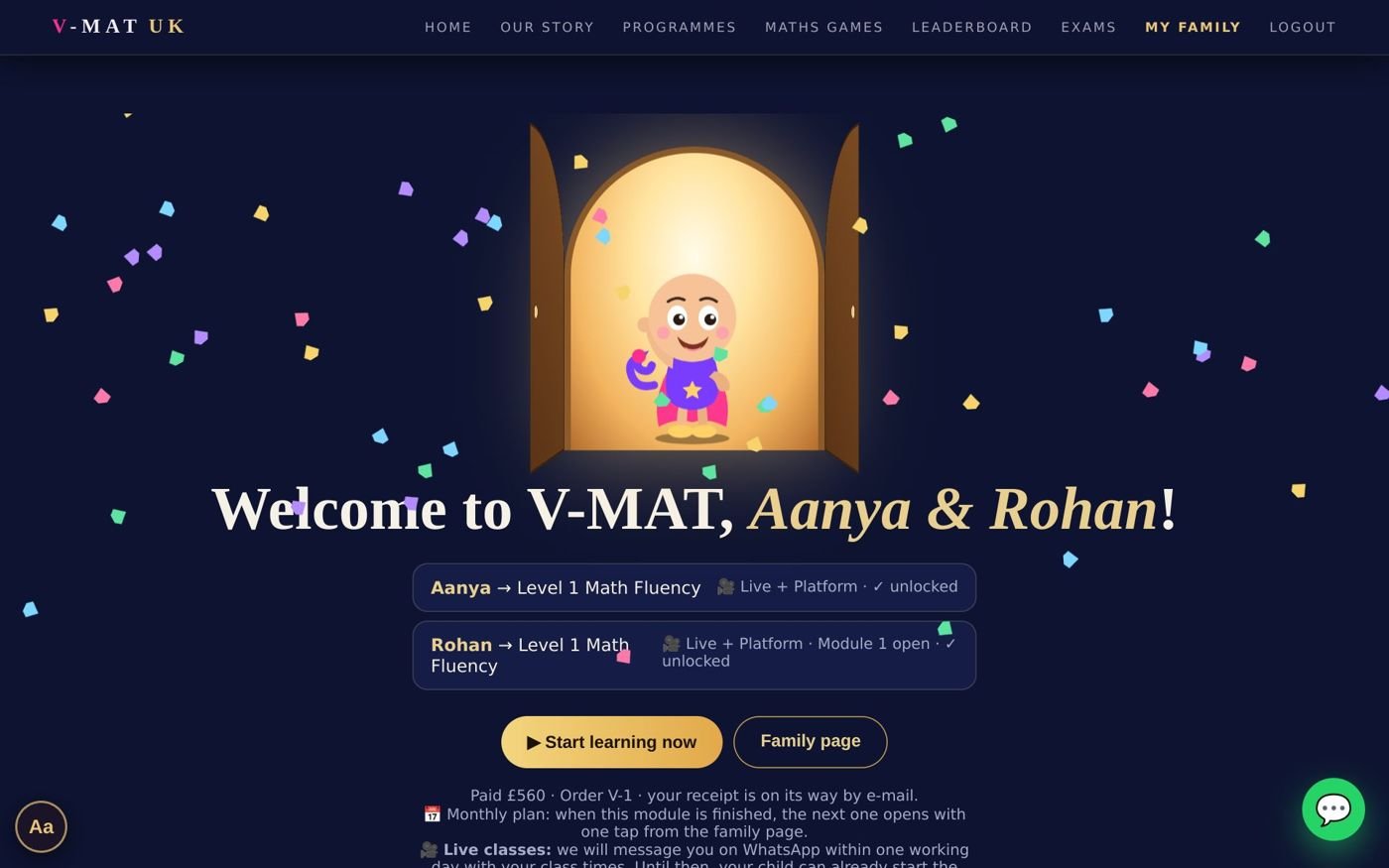
Paid — the welcome page lists each child's unlocked course.
Part 3
The monthly plan
Prefer to pay month by month? The monthly plan opens the course one module at a time — and you only ever pay the monthly amount.
- Month 1 — you pay the monthly amount and Module 1 opens.
- When Module 1 is finished (every lesson played to the end) — or when the month is nearly over — a gold card appears on your family page and on your child's page.
- Press Open Module 2 — US$ 85. You see only the monthly amount, pay, and the next module opens at once. This repeats until the last module.

The family page — Rohan finished Module 1, so the gold “Open Module 2” card is ready. (Example prices from vmat.uk.)
🌟 Fast learners
A child who finishes every lesson early may open the next module after 14 days in the current one — no need to wait for the month to end.
🔓 Open everything later
Under the gold card: “open the whole course now — pay the rest”. You pay only the full price minus the months already paid.
📧 Reminders
We e-mail you 7 days and 1 day before the paid month ends, with a one-tap button to open the next module.
💜 Nothing is ever lost
If a month runs out, every lesson finished, streak and V-GEM stays saved. One tap continues.
Part 4
Signing in and your family page
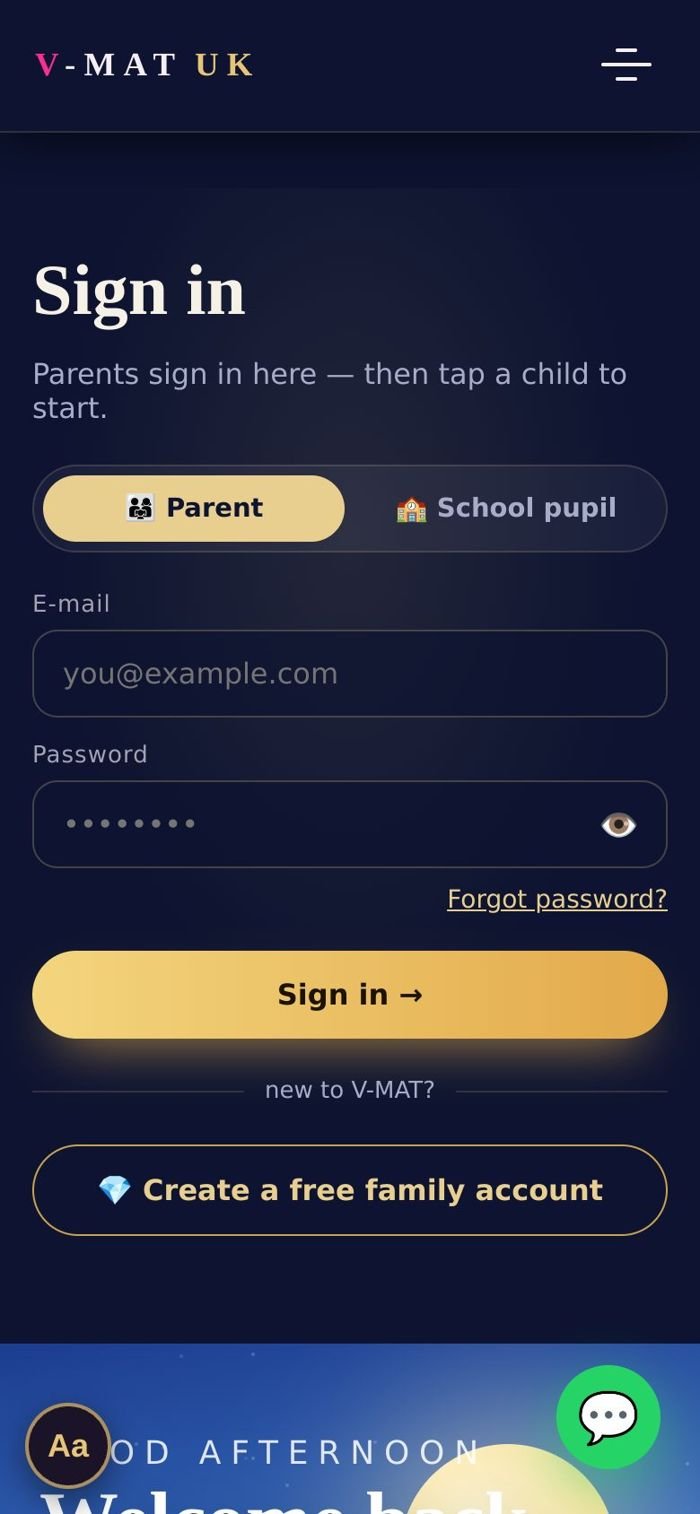
Sign in — choose “Parent”.
- On the website press Sign in (top right, or the ☰ menu on a phone).
- Choose Parent, type your e-mail and password, and press Sign in →.
- Your family page opens. Under “Who's learning today?” each child has a card.
- Press ▶ Start learning on your child's card — their own learning page opens.
- To come back, press Switch child or Family page on the child's page.
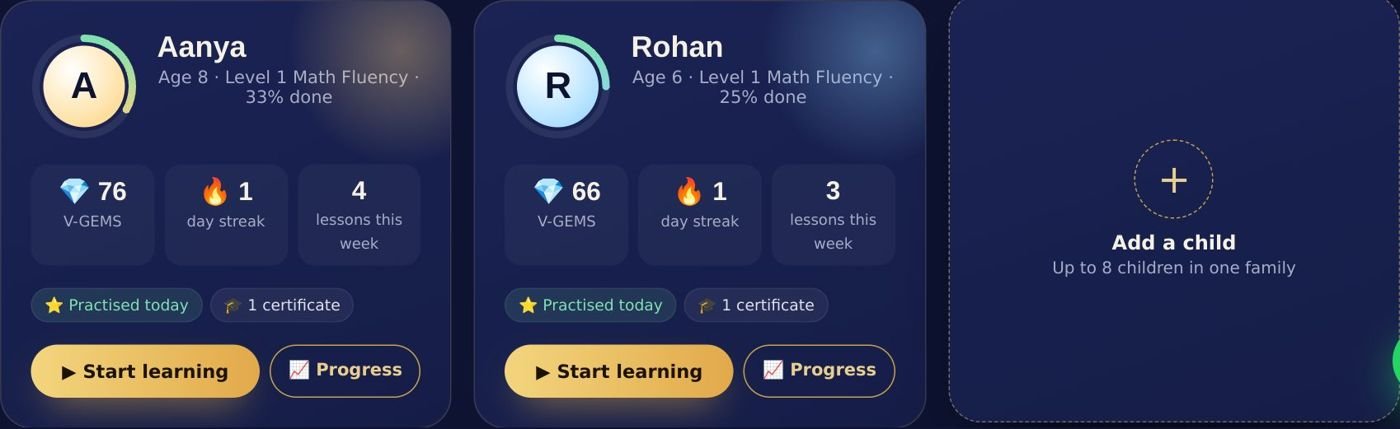
Each child's card shows V-GEMS, the day streak and lessons this week, with Start learning and Progress.
🔒 Picture PIN for young children (optional)
So brothers and sisters do not open each other's learning by mistake, you can give each child a secret of 4 pictures. Family page → Picture PIN → choose the child and 4 pictures → Save PIN. The child taps the pictures to open their page.
Part 5
Your child's learning page
Everything your child needs is on one page. Vimo greets them and shows Today's 30-minute plan — the next lesson, a game and a quick practice.
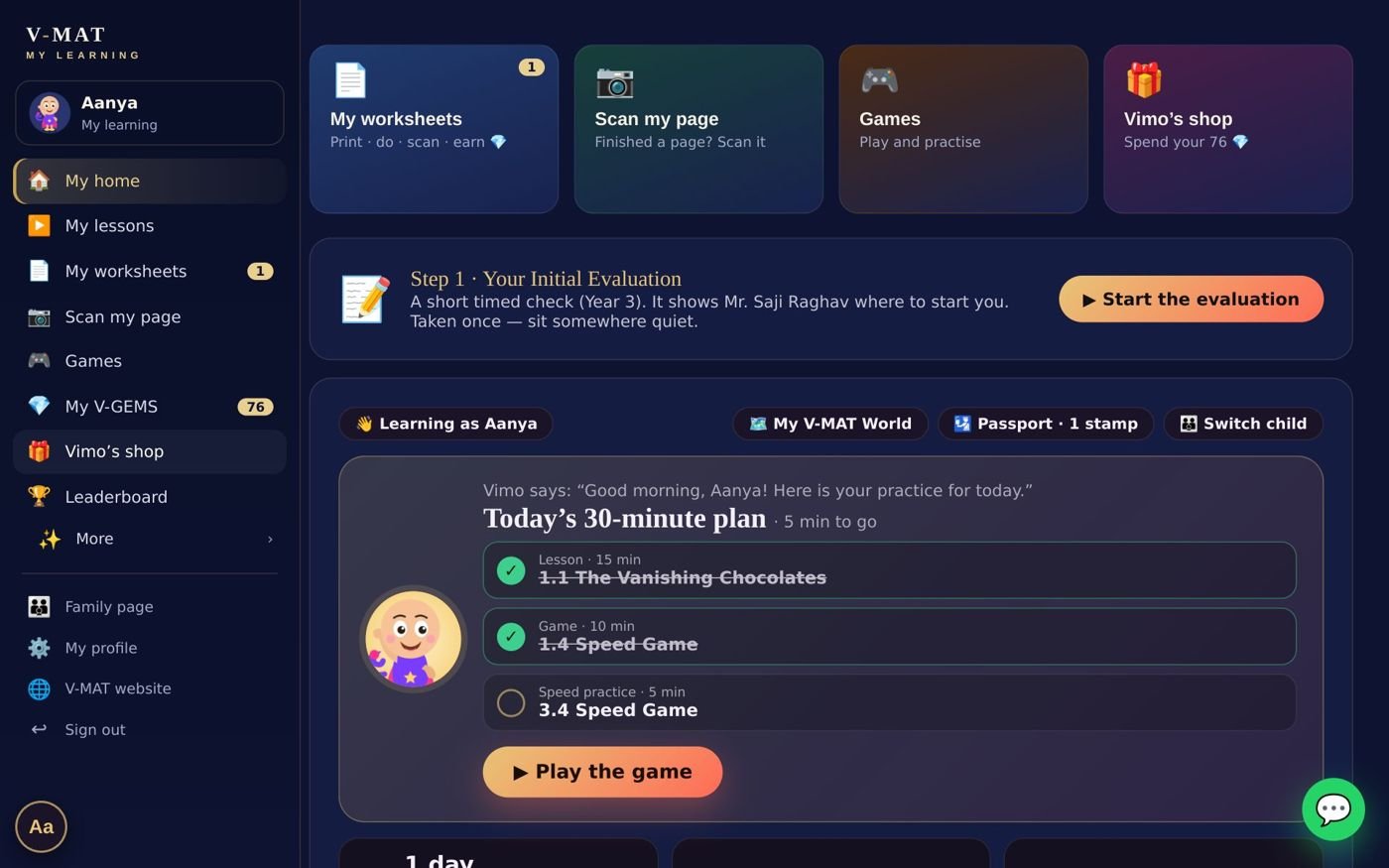
On a laptop — the menu on the left, today's plan in the middle.

On a phone — big buttons and a bar at the bottom.
| Button | What it does |
|---|---|
| ▶ My lessons | Lessons and games in order, module by module. |
| 📄 My worksheets | Download your child's own printable copy. |
| 📷 Scan my page | Scan a finished worksheet page to collect V-GEMS. |
| 🎮 Games | Math games to practice the lessons. |
| 💎 My V-GEMS | The V-GEM treasure and level. |
| 🛍️ Vimo's shop | Fun outfits for Vimo, bought with V-GEMS. |
| 🧠 Daily 5-minute check | A quick daily check and speed score. |
| 🗺️ My V-MAT World | The whole course as a map. |
Part 6
Watching a lesson
- On the child's page press the next lesson in Today's plan, or open My lessons and choose one.
- The lesson opens full-screen. Vimo asks your child's name, then Mr. Saji Raghav teaches step by step. Your child answers, drags and taps as they go.
- When the lesson is played to the end, it gets its ✓ tick, earns points, and the next step lights up.
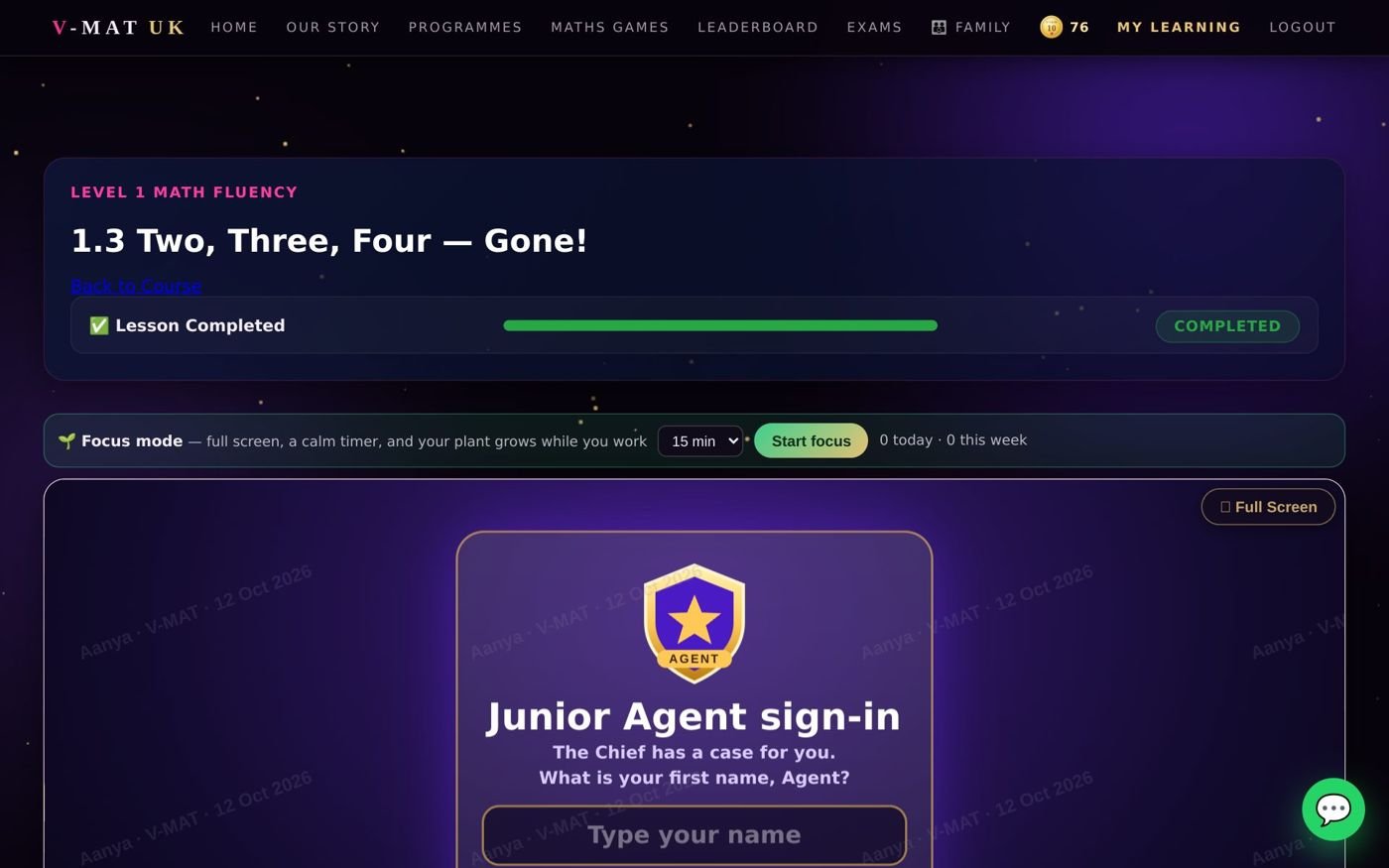
A lesson — the progress bar at the top shows how far your child has come.
The learning map
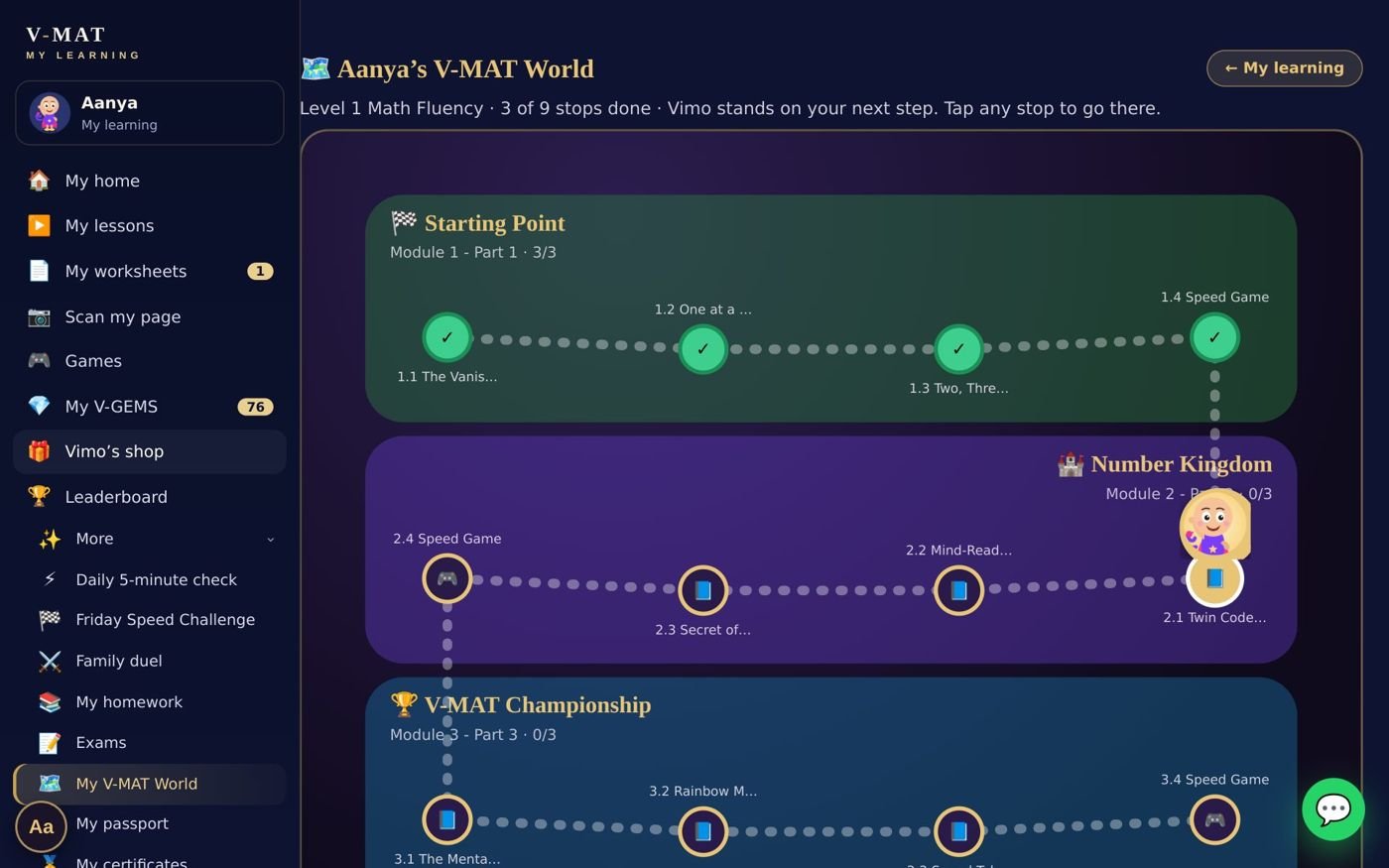
My V-MAT World — ✓ done, ★ next (where Vimo stands), ○ open, 🔒 opens later.
Part 7
Worksheets and writing practice
✍️ Why writing matters — a note from Mr. Saji Raghav
The games and digital practice are wonderful, and many children love them. But a new skill becomes permanent when the child also writes it with their own hand. Writing slows the mind down just enough to understand each step. We strongly recommend one worksheet page a few times a week — it is not compulsory, but it makes the biggest difference.
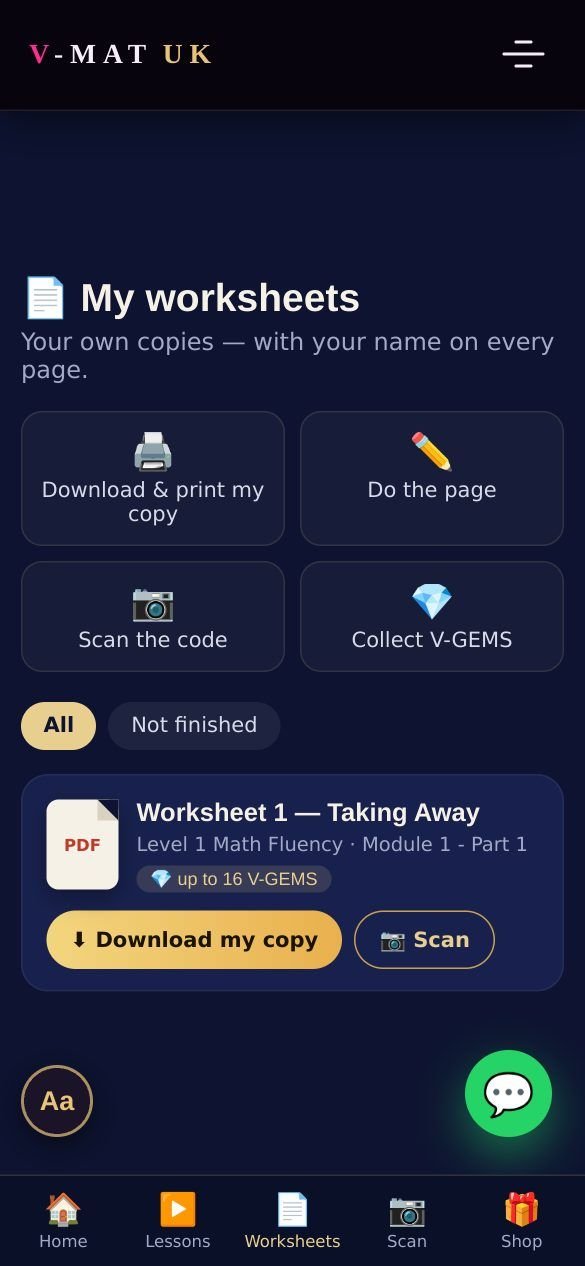
My worksheets — every worksheet of the course in one place.
- On the child's page press 📄 My worksheets.
- Press ⬇ Download my copy. A PDF is made with your child's name on every page, and a small V-GEM code on the pages that earn gems.
- Print it at home (or open it on a tablet and write on paper). Your child does the page — neatly, in pencil.
- Press 📷 Scan and show the code to the camera — or type the 8 letters printed under it. The V-GEMS arrive at once.
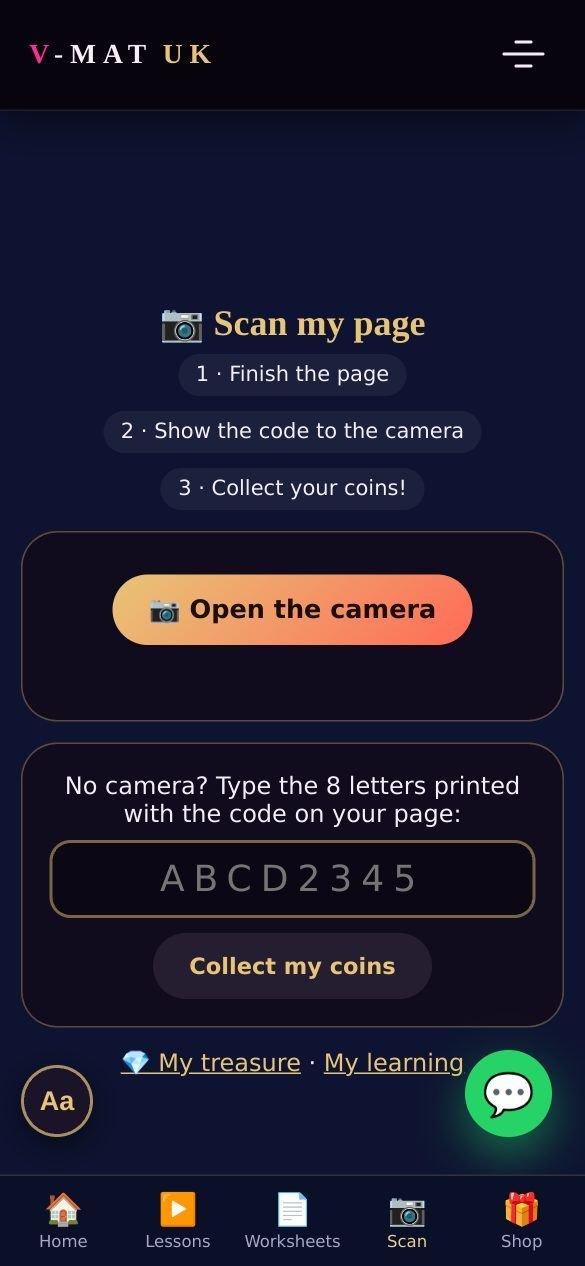
📷 Scanning a page
Scanning works inside V-MAT on a phone, tablet or laptop camera. Nothing is uploaded — the picture stays on your device. If the camera does not open, type the 8-letter code instead.
For the toughest pages (10 V-GEMS) you will get an e-mail “Please check your child's worksheet ✅”. Look at the page and press approve — one tap in the e-mail, or on the family page under Worksheets & V-GEMS.
Part 8
V-GEMS — the rules
V-GEMS are V-MAT's reward coins. They are earned only by real learning — never bought with money, never for just clicking.
| How to earn | V-GEMS |
|---|---|
| Learning on V-MAT — finished lessons, practice time and quizzes add points | Every 100 points = 10 V-GEMS |
| A worksheet page — simple | 🥉 1 gem, at once |
| A worksheet page — tough | 🥈 5 gems, at once |
| A worksheet page — toughest / test | 🥇 10 gems, after a parent's ✅ |
The fair-play rules
- Each worksheet page pays once per child.
- Up to 100 worksheet V-GEMS a day, and one scan every 20 seconds.
- A parent may take back a page's coins within 48 hours if the page was not really done.
- The V-GEM treasure never goes down — not even when the leaderboard starts a new season.
- V-GEMS have no money value and cannot be exchanged for money.
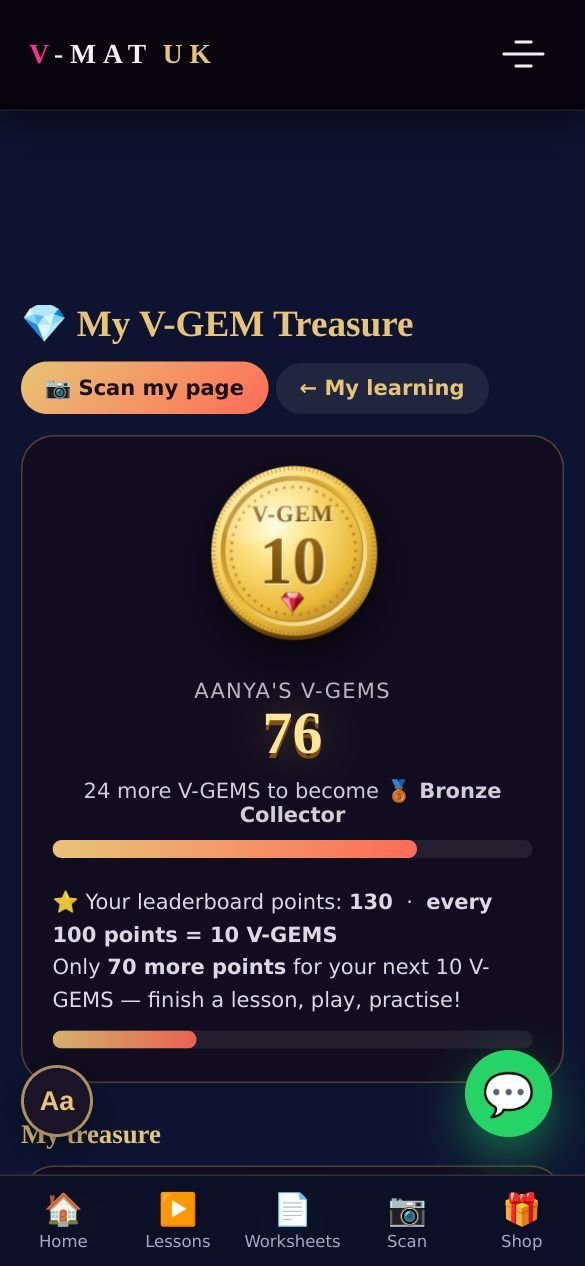
My V-GEM Treasure — new coins drop in with a “ching”.
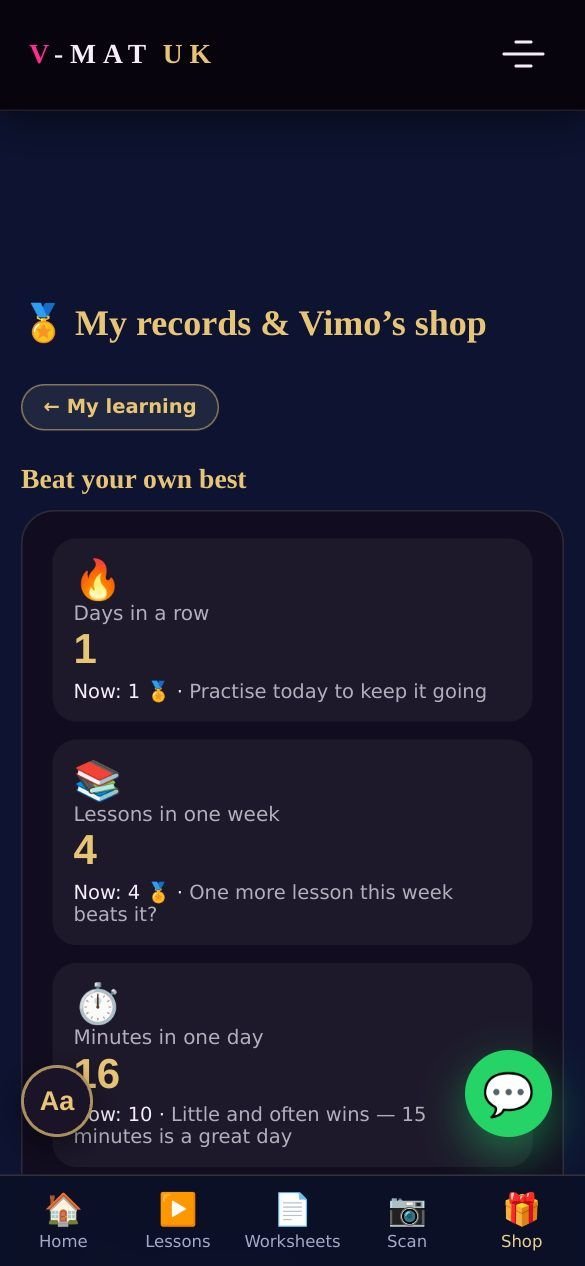
🛍️ Spending V-GEMS
In Vimo's shop your child dresses Vimo with fun hats, glasses, pets and backgrounds. Spending never reduces the treasure count — the treasure shows every gem ever earned. Gem levels (Bronze Collector and up) celebrate steady effort.
Part 9
The daily check and the Fix-it Lab
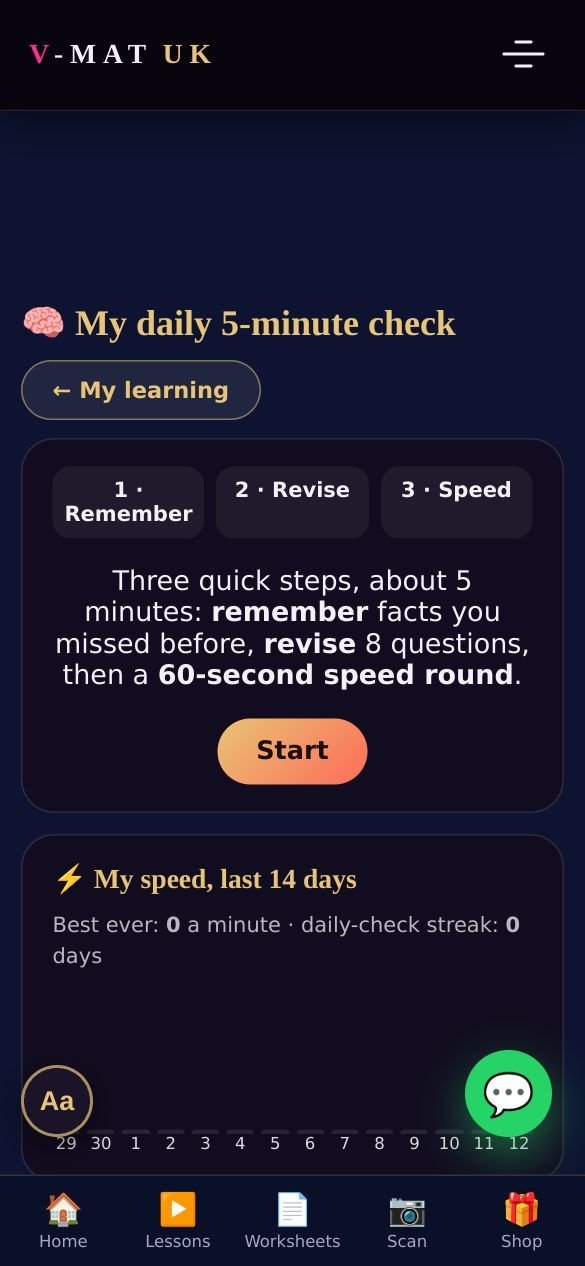
My daily 5-minute check.
🧠 The daily 5-minute check
Three quick steps, about five minutes, once a day:
| 1 · Remember | Up to 5 facts your child missed before come back today. |
| 2 · Revise | 8 calm questions at your child's level. |
| 3 · Speed | A 60-second round — the right answers give today's QPM (questions per minute). |
The QPM of the last 14 days is drawn as a line, so you can watch the speed grow.
🔧 The Fix-it Lab
Every wrong answer from a quiz goes into your child's own Fix-it Lab. It comes back on later days until it is answered right on two different days — then it is fixed for good. No mistake is wasted.
More to enjoy
🤝 Practice buddies
Two children keep a streak together — brothers and sisters at once, friends with the friend's parent's approval.
🛂 Math passport
Each game comes from a country of the world — finishing it adds a stamp and a fun fact.
🏆 Leaderboard
Points for real practice. Children are shown by first name and initial only.
🎂 Birthdays and festivals
Vimo celebrates your child's birthday and the big festivals on the learning page.
Part 10
Following your child's progress
- On your family page press 📈 Progress on your child's card.
- You see this week compared with last week: lessons, games, practice days and the streak, the last 8 weeks at a glance, and how far through each module your child is.
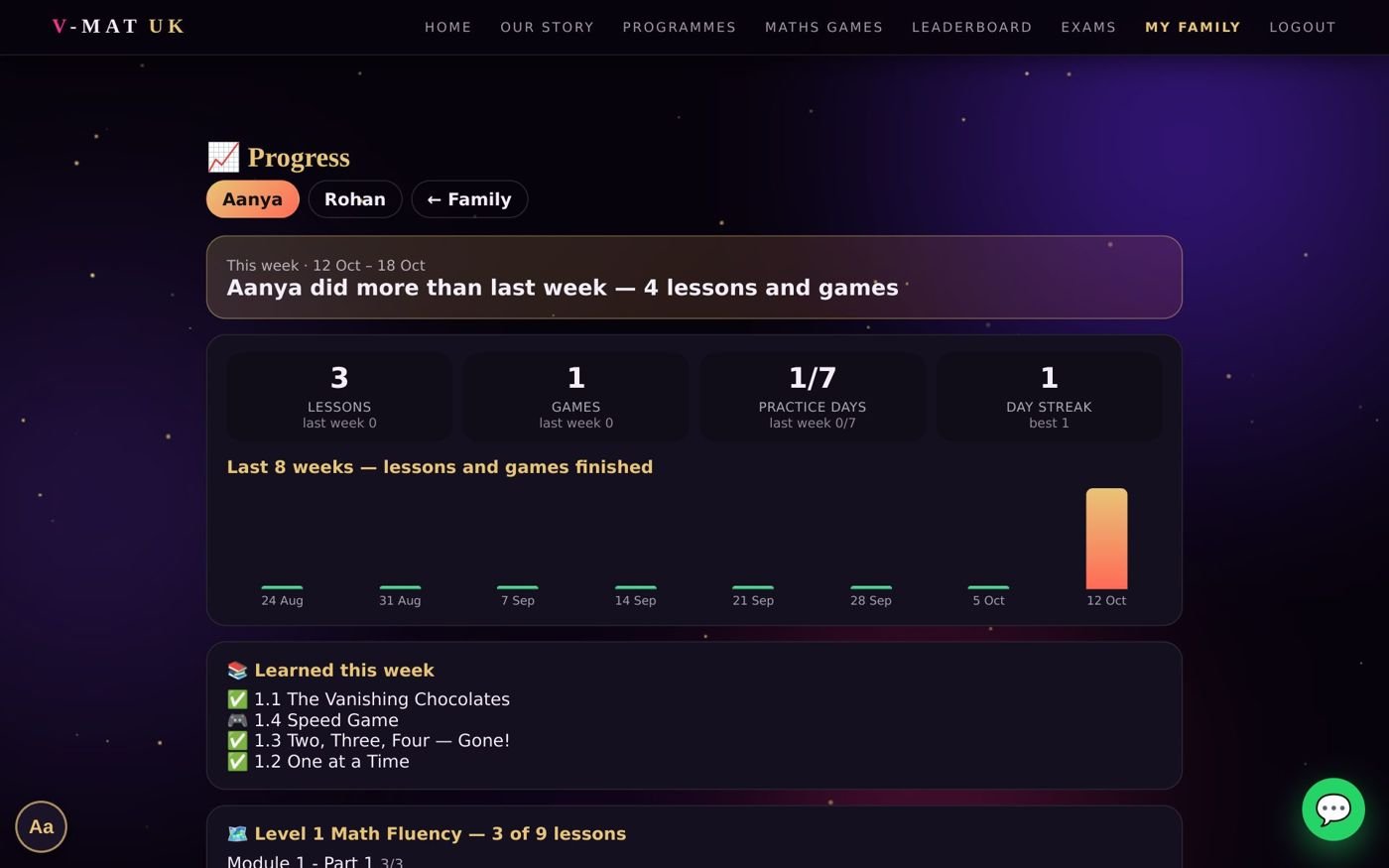
The progress page — the same numbers as the weekly progress e-mail.
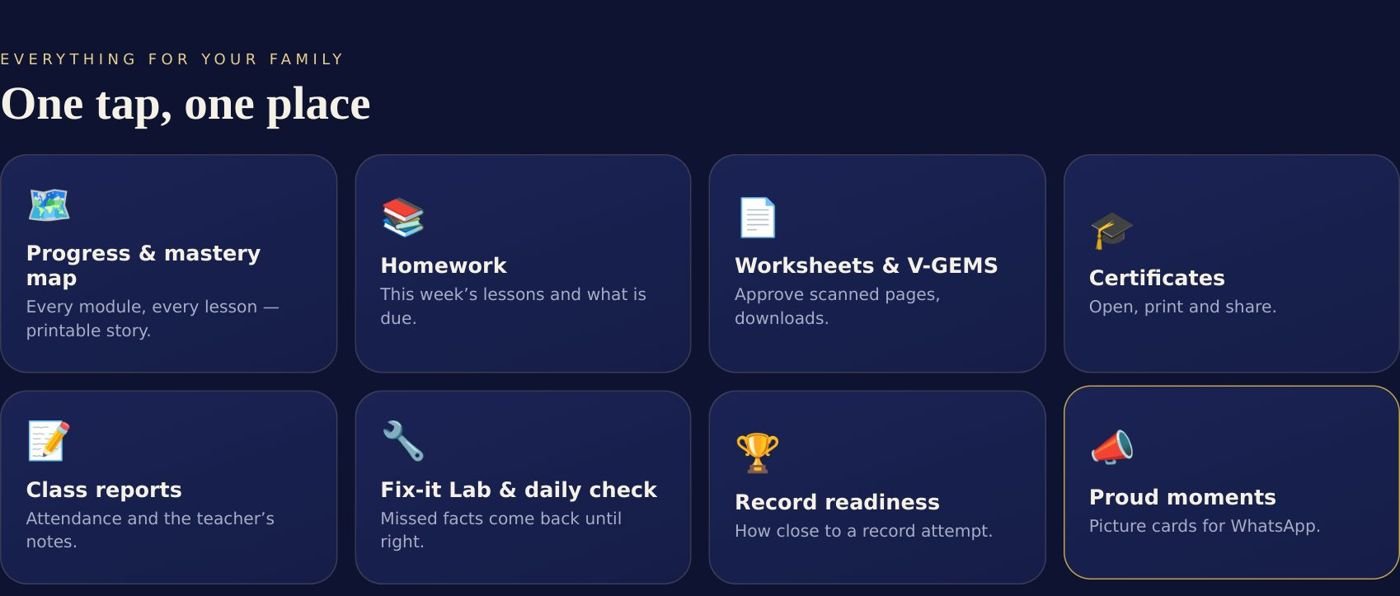
Family page → “One tap, one place”: progress map, homework, worksheets, certificates, class reports, Fix-it Lab and more.
📧 Weekly e-mail
Every week you receive a short progress e-mail — no need to sign in to see how it is going.
🎓 Certificates
Issued automatically when a module or a course is finished. Print or share — each has a code anyone can check on our website.
📣 Proud moments
A beautiful picture card (first name only) to share with grandparents on WhatsApp.
📝 Class reports
On the Live plan: attendance and the teacher's notes after each class.
Part 11
Family settings
At the bottom of your family page, under “Set it once, forget it”.
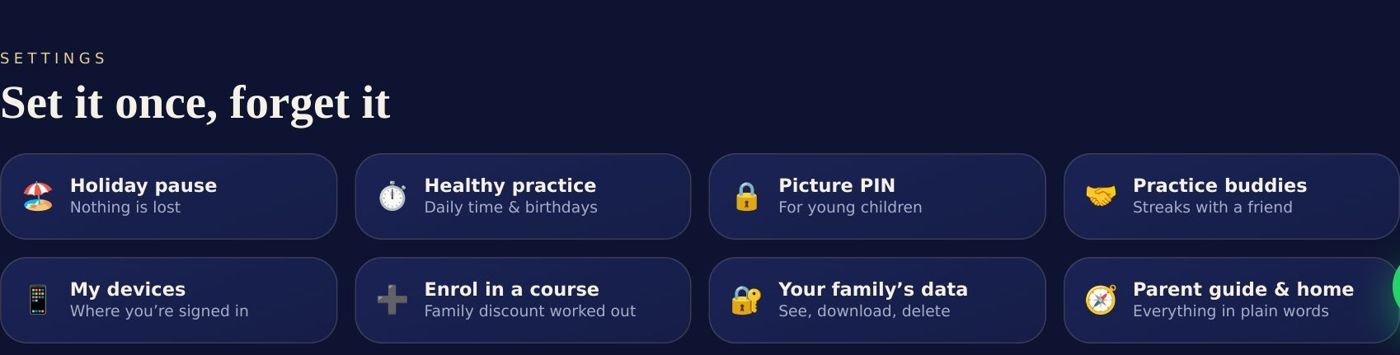
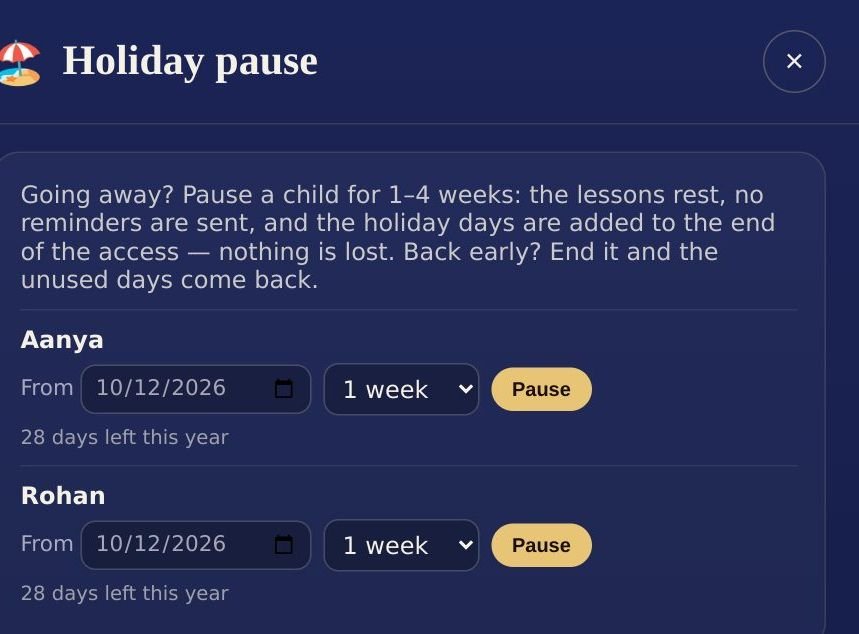
Holiday pause.
🏖️ Holiday pause
Going away? Pause a child for 1 to 4 weeks. The lessons rest, no reminders are sent, and the holiday days are added to the end of the access — no paid day is lost. Back early? End it, and the unused days come back.
⏱️ Healthy practice
Set a sensible daily time and your child's birthday (for Vimo's birthday party).
📱 My devices
Each child can be open on one device at a time. Opening the child on a new device closes the old one — so please do not share a child's learning with another child. Brothers and sisters each have their own profile and never close each other. Your own parent login works on up to 3 devices. You can sign any device out here.
➕ Add a child
Family page → + Add a child (up to 8). Then enroll them — the Family & Friends discount is worked out automatically.
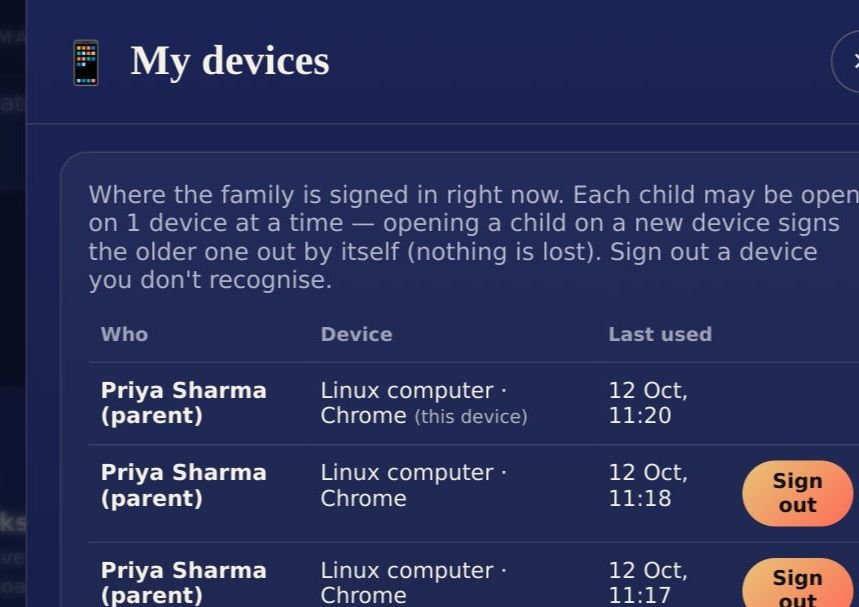
My devices.
Part 12
Payments, live classes and privacy
💳 Payments and renewals
- All payments are made through Razorpay's secure payment window. V-MAT never sees or stores your card details.
- A receipt is e-mailed to you after every payment.
- No automatic renewals. We remind you by e-mail 7 days and 1 day before access ends; you choose whether to continue.
- To add a course or a child later: family page → Enroll in a course, or press Enroll now on any course.
- Refunds follow our Refund policy (link at the bottom of every page of the website).
🎥 Live classes
- On the Live + Platform plan we message you on WhatsApp within one working day with your child's class times.
- Until the first class, your child can already start the lessons on the platform.
- After each class the teacher's notes appear under Class reports on your family page.
🔒 Your child's privacy and safety
- Children have no e-mail of their own; they always learn through your family login.
- In public places (leaderboard, certificates) children appear by first name and initial only.
- Family page → Your family's data: see and download everything we hold, or ask us to delete a child or the whole family (with 7 days to change your mind).
- Worksheet photos (optional) are private and deleted after 30 days.
👀 The “Aa” button
The round Aa button at the bottom-left of every page makes the text larger and easier to read — helpful for younger children and grandparents alike.
Part 13
Quick answers and help
| If… | Then… |
|---|---|
| I forgot my password | Sign-in page → Forgot password? → follow the e-mail link. |
| A lesson shows a lock 🔒 | Its module has not opened yet. On the monthly plan, open the next module from the gold card on your family page. |
| A lesson did not get its ✓ | It must be played to the very end. Open it again and finish it. |
| There is no sound | Check the device volume and that it is not on silent; tap the lesson once to start the sound. |
| “Opened on another device” | The child was opened somewhere else. Go back to the family page and press Start learning again. |
| The camera does not scan | Allow the camera when asked, hold the page flat in good light — or type the 8 letters under the code. |
| I cannot find a worksheet | Child's page → My worksheets. Worksheets of later modules open with the module. |
| I want a second child to join | Family page → + Add a child, then enroll — the discount is automatic. |
| We are going on holiday | Family page → Holiday pause (1–4 weeks). No paid day is lost. |
| The payment did not go through | No money is taken for a failed payment. Try again, or another card — or WhatsApp us. |
💬 We are here to help
WhatsApp: the green button at the bottom-right of every page of our website.
E-mail: info@vmat.uk
Websites: vmat.uk · vmat.in · v-mat.us · vmatwebsite.com
Little and often.
Every day counts.
Ten calm minutes a day, a worksheet page in your child's own handwriting, and a word of praise from you — that is how fast minds and confident children are made.
— Mr. Saji Raghav, Founder, V-MAT Academy